How to place a listing on Breaqs
- How to upload photos to your listing?
- How to edit or manage a listing
- How to feature (boost) your listing
- Auction or fixed price: which should you choose?
This article walks you through creating a vehicle listing on Breaqs, from starting a new ad to submitting the form. It covers cars specifically, since that's the most common category, but the same flow applies to motorcycles, boats and other vehicles.
Starting a new listing
There are two ways to start listing a vehicle:
- Open the member dropdown menu and click Sell a vehicle.
- Or go to your Dashboard, then My Garage and click Add a vehicle to your garage.
Step 1: choose a category
First, pick the top-level category for the item you're listing:
- Cars
- Motorcycles
- Boats
- Other Vehicles
If you choose Cars or Motorcycles, you'll also be asked to select a brand and model as a subcategory. This determines which brand/model filters your listing shows up under in search.
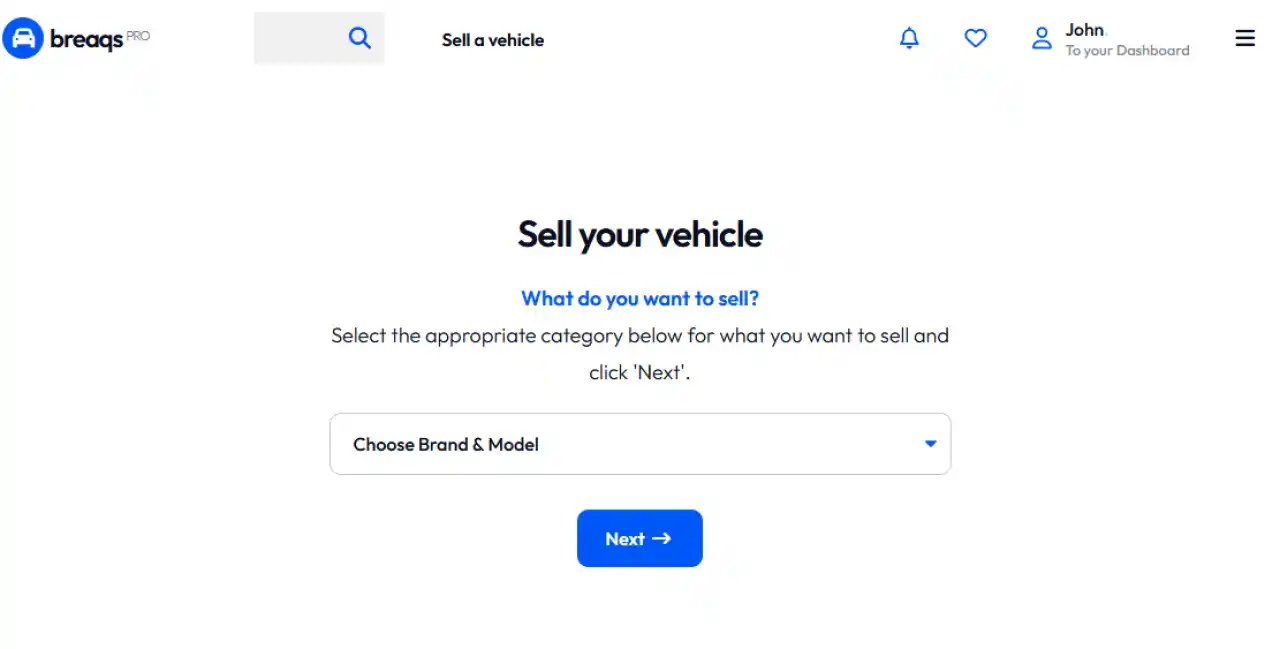
Screenshot choosing your category
Step 2: fill in the listing form
After choosing your category (and brand/model), you'll land on the main listing form. Here's what each part of it does.
Who can buy this vehicle?
Business accounts with a valid Breaqs Pro subscription see an extra option here: they can restrict the listing to verified dealers and professionals (Breaqs Pro users) only, instead of opening it up to everyone. Regular sellers don't need to worry about this - their listings are visible to all buyers by default.
Offer format
Every listing needs an offer type. There are three options:
Format What it means
| Auction | The vehicle goes to the highest bidder. You choose a start date and time and the auction runs for 7 days. You can set a reserve (minimum) price - if bidding doesn't reach it, the item isn't sold. We recommend scheduling the start at least a week out, so the listing stays discoverable and buyers have time to find and favorite it. |
| Fixed price | You set a set price. You can choose whether buyers are allowed to make offers below that price and if so, set a minimum offer amount. |
| Not for sale | The vehicle is shown to the community as part of the seller's collection, without being available for purchase. |
For Auction and Fixed price listings, sellers also choose a payment method: buyer pays directly on pickup, or (coming soon) full payment held securely through the Breaqs platform. Sellers never pay fees - only the winning bidder/buyer pays a commission on the final price.
Item details
This section covers the core listing info:
- Ad title - short and descriptive, max 65 characters.
- Tagline - a one-line summary shown in search results.
- Item condition - ranges from New, to Concours, to Project or For parts.
- Country of registration - where the vehicle is currently registered and plated.
- Tags - up to 10, must start with # and contain only letters/numbers. These help buyers find the listing.
Vehicle details
Technical specs: build year, mileage, engine power and displacement, number of cylinders, weight, number of previous owners, number of keys, doors, transmission type, fuel type, Euro emission standard, CO2 emission, body style, MOT expiry, VIN, color and upholstery color/material.
Options and accessories
A checklist of features grouped by category - Safety & Driver Assistance, Comfort & Interior, Exterior & Body, Technology & Infotainment, Parking & Visibility, Drivetrain & Performance and Practical & Administrative. Sellers simply tick whatever the vehicle has.
Vehicle condition
This is where sellers describe the vehicle's actual state, not just its specs:
- Overall exterior condition - e.g. original paint, partial/full repaint, or needs cosmetic attention.
- Operational status - from "does not start" to "runs and drives."
- Major component condition - checkboxes to flag known issues with the engine, gearbox, undercarriage, suspension/steering, or electrical system, plus a "No known major issues" option. If any issue is checked, a text field appears for a brief explanation.
Damage report
If the vehicle has visible damage, sellers can mark it directly on an interactive car diagram. Clicking a spot on the diagram opens a small form to log the type of damage (scratch, dent, rust, glass, paint, stone chip, other), its severity (minor/moderate/serious) and an optional note. Each marked point is numbered and listed below the diagram and can be edited or removed at any time.
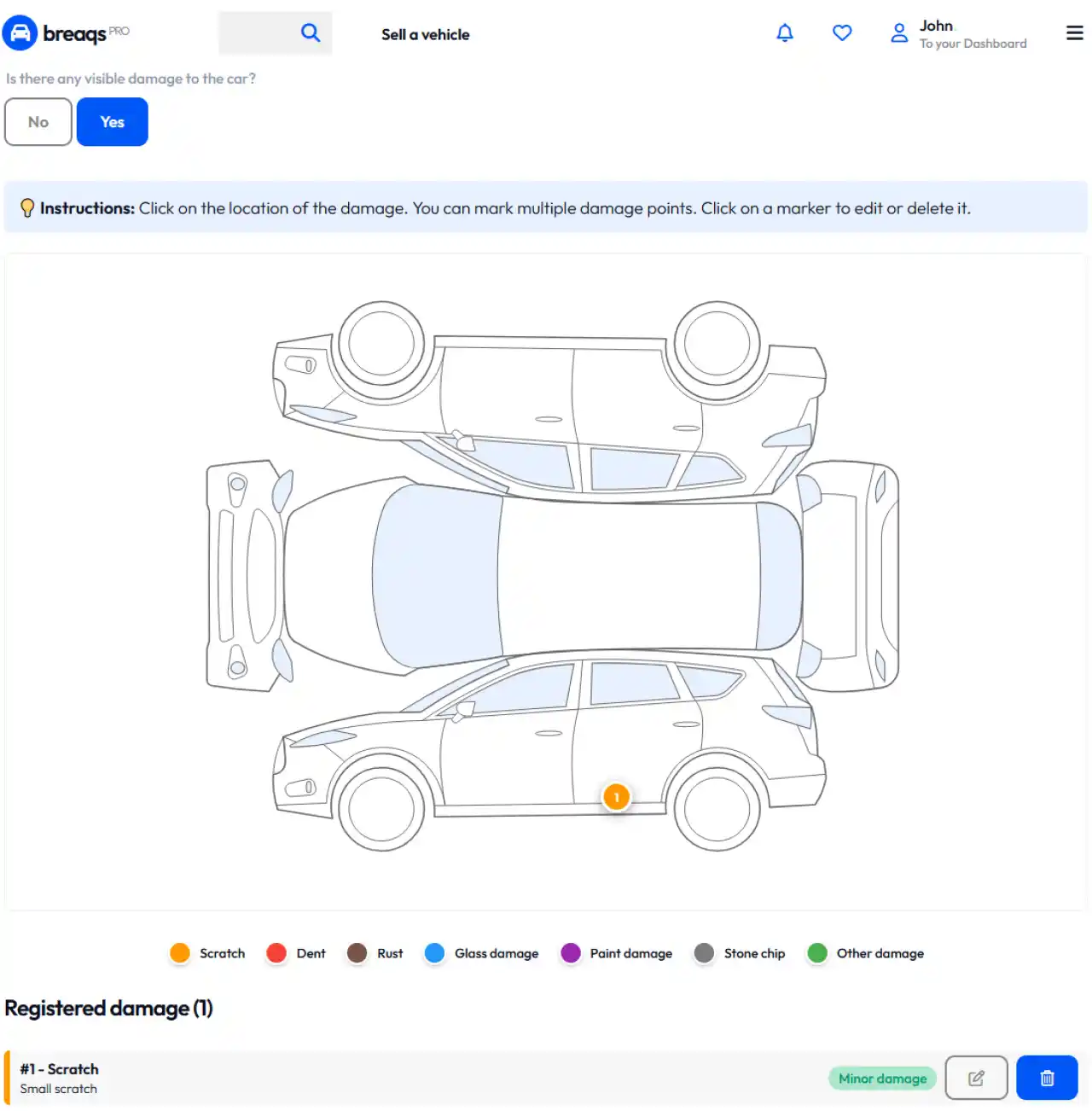
Screenshot Vehicle damage form
Description
A free-text field (with basic formatting: bold, italic, underline, lists) for the full ad description. YouTube links pasted into this field are automatically embedded.
Two optional fields below it help build buyer trust:
- Strong points - the highlights that make the vehicle stand out.
- Transparency report - any known imperfections or things a buyer should be aware of.
Shipping & transport
Sellers indicate whether they can help arrange transport for the buyer, or whether it's local pickup only.
Step 3: save
Once the form is complete, clicking Save takes the seller to the next step: adding photos to the listing.
Good to know
- Fields marked with (*) are required.
- The form autosaves automatically - every 30 seconds, a couple of seconds after you stop typing and when you leave the page - so progress isn't lost.
- Listing a vehicle on Breaqs is free;
Last update: August 16, 2026